
How to Stop Overtrading: Find the Trigger in Your Trade History
Product research based on TDLab workflows, hands-on testing and cited source material.
Overtrading is taking trades beyond the opportunities and risk allowed by your process. It is not defined by one universal number. Ten trades can be normal for one strategy and a serious violation for another. The useful question is not "how many trades are too many?" but "when do my additional trades stop meeting the same standard?"
That definition changes the solution. Instead of forcing yourself to trade less, you can locate the point where setup quality, sizing or rule adherence begins to deteriorate and build a guardrail around it.
Short answer
To stop overtrading, define the behavior against your plan, compare early and late trades in each session, identify the trigger behind the extra trades and test one observable limit. Then track whether the rule is respected on future sessions.Why TDLab does not grade trade count alone
A high trade count can be normal for one playbook and a clear process break for another. TDLab therefore compares timing, setup, size, previous result and plan adherence before treating additional trades as a behavior worth constraining.What overtrading actually looks like
Overtrading can appear as frequency, but the count is only one expression. Review these four forms separately:
- Frequency: taking more trades than the strategy or session plan allows.
- Setup dilution: accepting weaker entries after the best opportunities have passed.
- Risk expansion: increasing size or total exposure because the day is behind target.
- Time expansion: continuing outside the planned session or returning to the market after the stop condition.
A trader may violate one of these without having an unusually high trade count. That is why a daily total alone rarely explains the problem.
Find the point where extra trades become expensive
Number every trade in the session
Label trades first, second, third and so on within the trading day. Compare later trades with the first group on setup, plan adherence, execution quality, size, fees and net result. The purpose is not to declare that trade number four is always bad. It is to see whether your own process changes as the session continues.
Compare marginal trade quality
Ask what each additional trade contributed. Did the later trades contain qualified setups, or did they add fees, drawdown and rule violations? Keep valid losing trades separate from weak trades. A loss that followed the plan is not evidence of overtrading.
Segment by trigger
Repeat the comparison after a loss, after a large win, near the end of the session and on days with no early setup. Different triggers need different rules. If the extra trades cluster after losses, inspect them separately for the timing and urgency that characterize revenge trading.
Inspect the trades behind the average
A few large outcomes can distort a small sample. Use the segment to find sessions worth opening and reviewing, not to turn one historical average into a permanent law.Choose a rule that matches the trigger
"Trade less" cannot be evaluated. Use a rule with a trigger and a visible action.
- Maximum trades per day: useful when quality drops after a stable trade number.
- Cooldown after a loss: useful when re-entry becomes faster and less selective after losing trades.
- Playbook-only re-entry: useful when later trades no longer match a defined setup.
- Session cutoff: useful when trades outside a time window have lower process quality.
- Stop after consecutive losses: useful when a loss sequence reliably changes execution.
Do not activate all of them at once. Multiple restrictions make it difficult to learn which rule changed the behavior.
Test the guardrail on your trade history
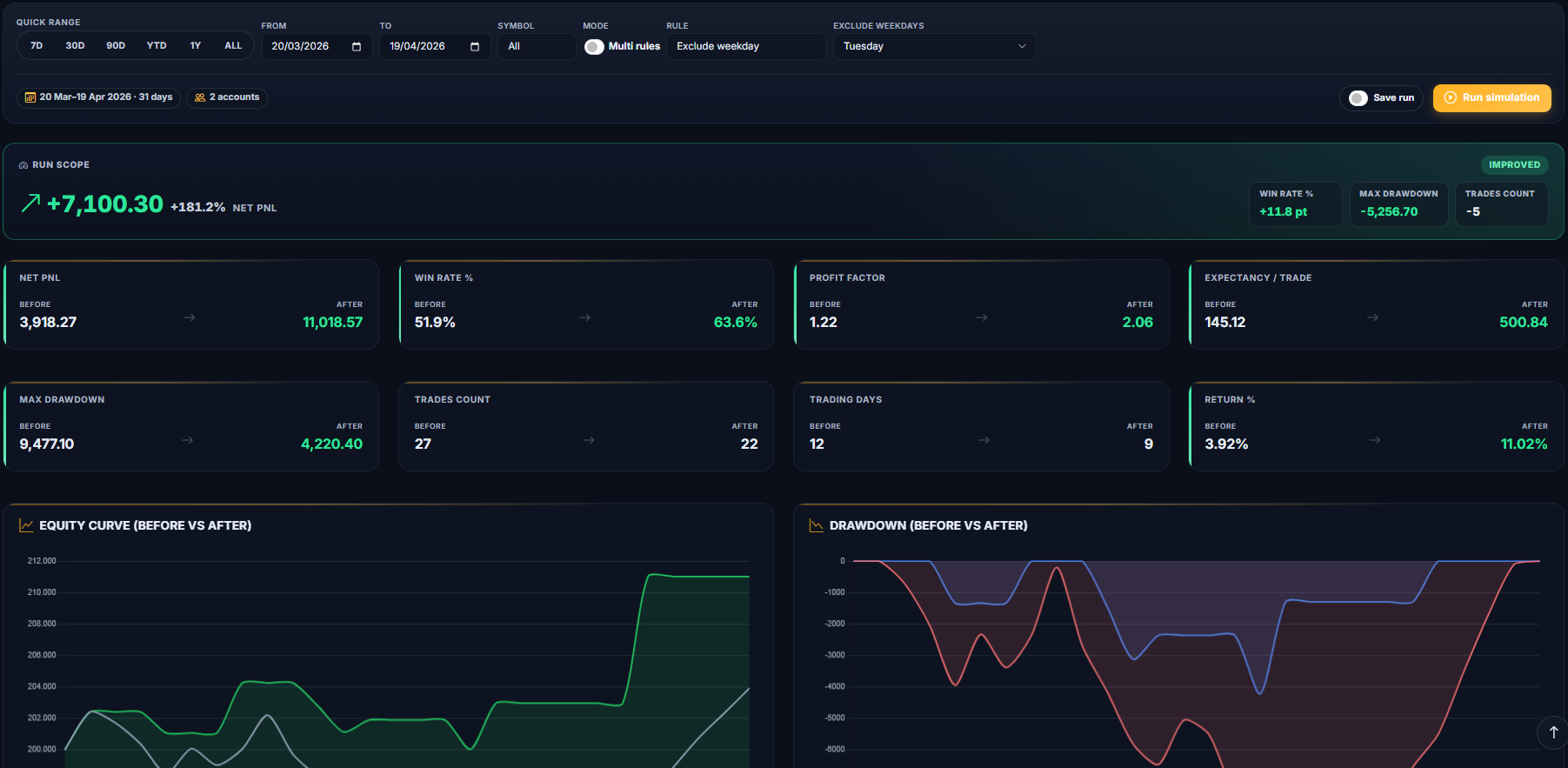
Apply the candidate rule to closed trades and inspect what it would have excluded. Compare net P&L, drawdown, loss streak, trade count and the quality of removed setups. Historical improvement is not a promise of future performance; the simulation is a way to expose the trade-off before the rule enters your playbook.
TDLab supports maximum-trade, cooldown, consecutive-loss, time-block and setup filters. The Rule Simulator guide shows the workflow from candidate rule to saved run.
Measure whether the fix survives live trading
Promote one rule and evaluate it as respected, violated or not applicable on new trades. Review adherence weekly alongside the original problem: later-trade quality, size, setup match or post-loss behavior. A rule that looks excellent in hindsight but is repeatedly ambiguous in live review needs a clearer definition. Keep not-applicable and unreviewed trades out of the compliance rate.
Verify that the reviewed sample is large and complete enough before judging whether the rule survived live trading. Report review coverage beside the adherence rate so missing grades remain visible.
Common questions
How many trades per day is overtrading?
There is no universal number. Define the limit from the strategy, session and risk plan, then inspect whether later trades show weaker setups or lower adherence in your own history.
Is overtrading the same as revenge trading?
No. Revenge trading is driven by the attempt to recover or respond to a recent loss. Overtrading can also follow boredom, a large win, missed opportunities or the absence of a stopping rule.
Can a maximum-trades rule solve overtrading?
It can stop the frequency, but it may not address setup dilution, oversizing or trading outside the planned session. Match the rule to the behavior your review actually found.
Test the guardrail before you trust it.
Use your own trade history to inspect where quality deteriorates, simulate one corrective rule and track whether you follow it afterward.