Following your rules with Account Rules
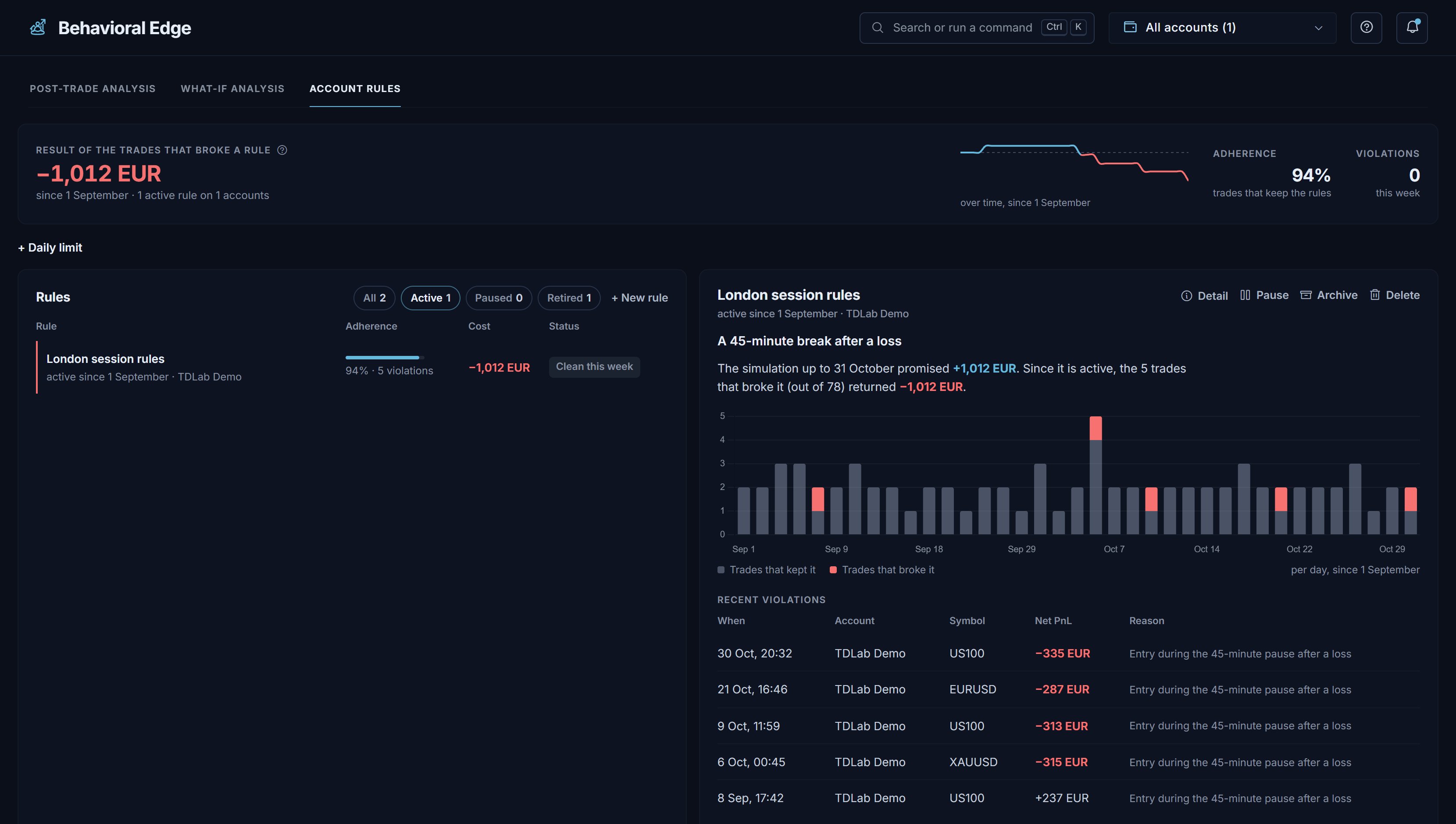
A rule is a limit you set yourself: max trades a day, stop after N losses, no trades in a time slot. In Account Rules, the third tab of Behavioral Edge, TDLab checks every new trade against your active rules, tells you whether you kept them and what it cost you when you did not.
Where rules come from
Most rules are adopted from the What-if analysis after a simulation: they keep a link to that simulation, its period and its result. Daily limits are the exception: with + Daily limit you enter max trades per day and max loss per day by hand, and TDLab checks them on the trades you import from that day on. The Origin column says which: created from What-if or created by hand. Each rule belongs to one account.
The overview
The card at the top shows the result of the trades that broke a rule since your rules became active, with its trend over time and the equity without those trades. A negative figure means the rule would have spared you that loss. Next to it: Adherence, the share of trades that keep the rules, and Violations this week.
The rules table
Filter by All, Active, Paused or Retired. For each rule you see the account, origin, adherence, violation cost and a status such as Kept, Clean this week, Broken 3 times or Waiting for trades.
How trades are checked
Each trade is marked against a rule as:
- Respected: the rule applied and the trade complied.
- Violated: the rule applied and the trade broke it, with the reason, for example “Entry during the 90-minute pause after a loss”.
- Not applicable: the rule did not apply to the trade.
A trade can also be not evaluable when the rule needs a field you did not fill in, such as setup or execution quality. Adherence is respected ÷ (respected + violated): not-applicable trades are ignored. Adherence feeds your Behavior Score.
The educational guide to measuring trading plan adherence explains why coverage, applicability and profitable violations must be reviewed beside the percentage.
Rule detail
Select a rule to read its story in one sentence: what the simulation promised and what the trades that broke it returned since it became active. Below it you find a daily chart of the trades that kept and broke the rule, the per-account breakdown and the latest violations. The Detail window adds the origin simulation, the period evaluated, the counts of evaluated, not applicable and not evaluable trades, and a recompute.
Rule statuses
- Active: new trades are checked continuously.
- Paused: checking stops, history is kept. Resume it at any time.
- Retired: archived and no longer checked.
Plan
Account Rules and the Weekly Review are included in the 14-day trial and in Pro. After the trial, without a subscription, they stay locked.Understand the method
Put the evidence to work.
Connect your real trades with behavior, rules and historical market context. Start free for 14 days.